
Data flow
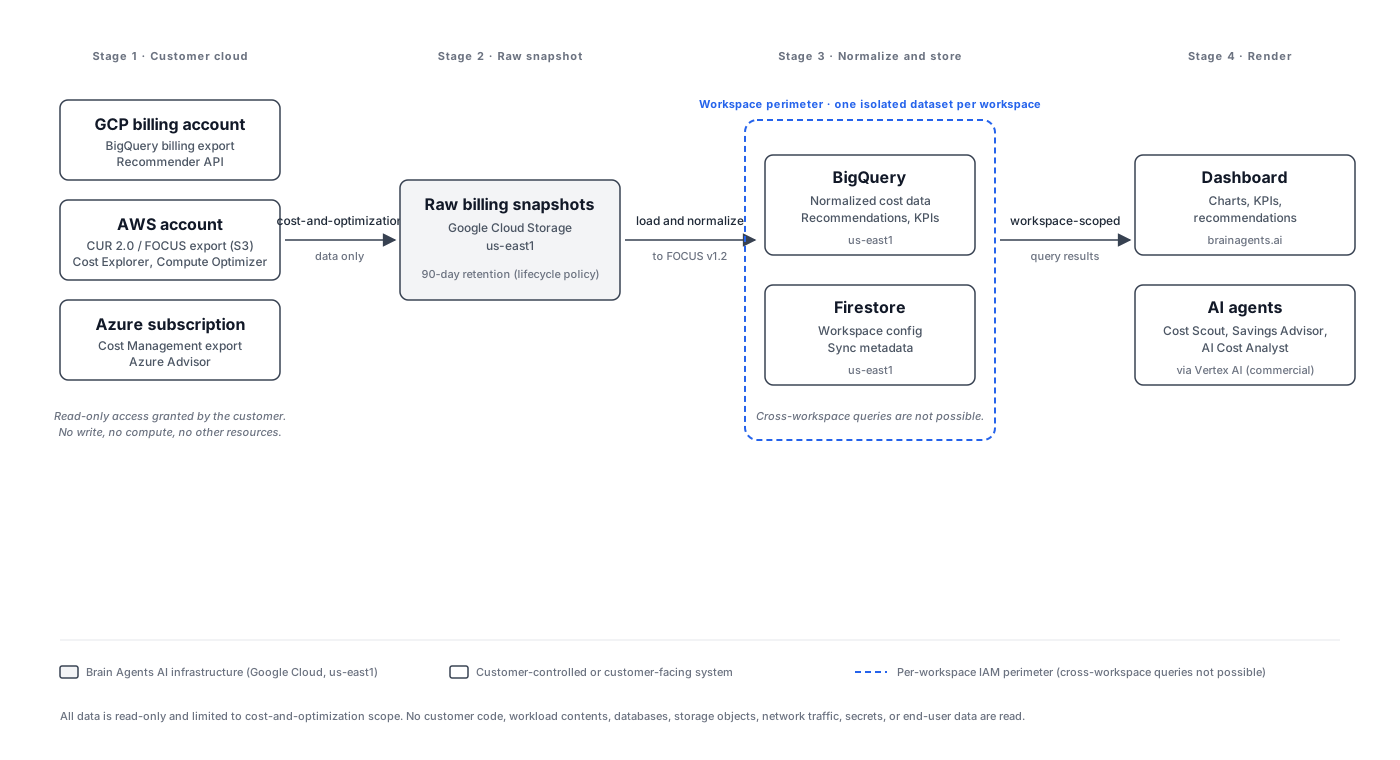
From the moment a customer clicks "Connect GCP" (or AWS, or Azure) to the moment a chart renders on the dashboard, this is exactly what happens to the data. Brain Agents AI reads cost-and-optimization data from connected customer cloud accounts on a strictly read-only basis. That includes line-item billing data, optimization recommendations from each cloud's native advisors, and the resource metadata required to interpret cost. It does not include customer code, workload contents, databases, storage objects, network traffic, secrets, or end-user data. All processing happens in Google Cloud us-east1, and each customer workspace is stored in its own isolated dataset.
Architecture
The diagram below is the canonical view of the flow. Each arrow is labeled with what crosses it, and the per-workspace perimeter shows where tenant isolation is enforced.
Per-cloud access scope
Customers grant a narrow, read-only permission on each cloud they connect. The permission is the only thing that changes hands; the customer's account remains theirs and their compute, storage, networking, and data resources are unaffected.
| Cloud | Permission | Grants | Does NOT grant | | --- | --- | --- | --- | | GCP | IAM binding for read on BigQuery billing export dataset | Read access to billing export and Recommender API | No access to other BigQuery datasets, compute, storage | | AWS | IAM role for CUR 2.0 / FOCUS export | Read access to CUR S3 bucket, Cost Explorer, Compute Optimizer | No access to other buckets, EC2, RDS, VPC | | Azure | Lighthouse delegation for Cost Management export | Read access to billing/cost export and Azure Advisor | No access to subscriptions or resources beyond cost data |
What we read
We read four narrow categories of data from each connected cloud, and nothing else.
- Line-item billing data, normalized to FOCUS v1.2 for consistent cross-cloud analysis.
- Optimization recommendations from each cloud's native APIs: GCP Recommender API, AWS Cost Explorer plus Compute Optimizer, and Azure Advisor.
- Resource metadata (resource IDs, types, regions) required to interpret cost data.
We do not read customer code, workload contents, databases, storage objects, network traffic, secrets, or end-user data. The permissions described above do not grant any of that, and the product does not request it.
What we store and where
All billing data is stored in BigQuery and Firestore in our Google Cloud project (us-east1), with one isolated dataset per workspace. Datasets are fully isolated; queries cannot cross workspace boundaries.
The breakdown by storage destination:
- Raw billing snapshots are written to Google Cloud Storage in
us-east1with a 90-day retention policy. Snapshots are the staging artifact between the customer's cloud and our BigQuery load. - Normalized data is loaded into BigQuery in
us-east1and retained for the life of the subscription. This is what the dashboard and the AI agents read. - Sync metadata and workspace configuration (which clouds are connected, last sync time, workspace settings) are stored in Firestore in
us-east1.
Multi-account handling
Brain Agents AI is multi-cloud and multi-account by design. Multi-account handling has two sides.
Customer-side. A customer grants one read-only access binding per source on each cloud they connect. A customer with three GCP billing accounts grants three IAM bindings; a customer with two AWS payer accounts attaches two IAM roles; a customer with multiple Azure subscriptions grants one Lighthouse delegation per subscription. Each binding is independently revocable.
Our-side. Data from all of a workspace's connected accounts is ingested into a single isolated workspace dataset. Cross-cloud comparisons (for example, total spend across GCP and AWS) are queries over that single dataset, not joins across separate tenants. Multi-account does not mean multi-dataset; the workspace is the unit of isolation.
Who can access this data
Three populations can read data inside a workspace's perimeter, and no one else.
- The customer, through the dashboard, scoped to their own workspace via authenticated access.
- Brain Agents AI engineering personnel, on a least-privilege basis, for support and operational reasons. Access is logged via Cloud Audit Logs and is reviewed periodically.
- Subprocessors, as listed at /security/subprocessors. Of those, only Google Cloud (including its AI infrastructure) has access to customer billing data. Resend, Stripe, Identity Platform, and Cloudflare process account or personal data only and never see customer billing data. GA4 collects anonymous marketing-site visitor data only and is not loaded on authenticated application routes.
What happens on disconnect
Disconnect is a customer-initiated action and is reversible up to the point of permanent deletion. The short version: removing a single cloud's binding triggers an immediate soft-delete and a background purge of that cloud's data from BigQuery, while other connected clouds keep running. Account, workspace, and other ingested data are unaffected. Reconnecting a cloud later performs a 90-day backfill on the reconnected cloud's billing data, subject to that cloud's own data availability. The full mechanics, per scenario, are at /security/disconnect.
What happens on cancellation
When a customer cancels their subscription, a 30-day reactivation window begins, during which all workspace data is preserved and reactivation restores access without re-onboarding. After 30 days, all workspace data is permanently deleted: BigQuery datasets, Firestore documents, and any remaining GCS snapshots not already aged out by the 90-day lifecycle. Workspace deletion (initiated separately from cancellation) follows a 7-day cooling plus 90-day soft-delete window, with permanent deletion at day 97. The full retention table and per-scenario detail is at /security/disconnect.
What we do NOT do
These are the commitments that define the product as much as the features do.
- We do not sell or rent customer data. Ever.
- We do not use customer billing data to train AI models, neither ours nor third parties'. Gemini calls run on the Vertex AI backend (
aiplatform.googleapis.com), under Google Cloud's commercial terms, which exclude prompt and response data from model training. - We do not aggregate customer data into industry benchmarks or comparative insights without explicit, opt-in consent. Benchmarking is opt-in by design; no workspace is included in cross-customer aggregates by default.
- We do not access customer cloud accounts beyond the read-only cost-and-optimization scope described above. The permissions granted at connection are the entirety of our access; we do not request more, escalate, or use the access for any other purpose.
Contact
For security and data-handling questions: [email protected].
For privacy and data-rights matters: [email protected].
Last updated: April 28, 2026.