
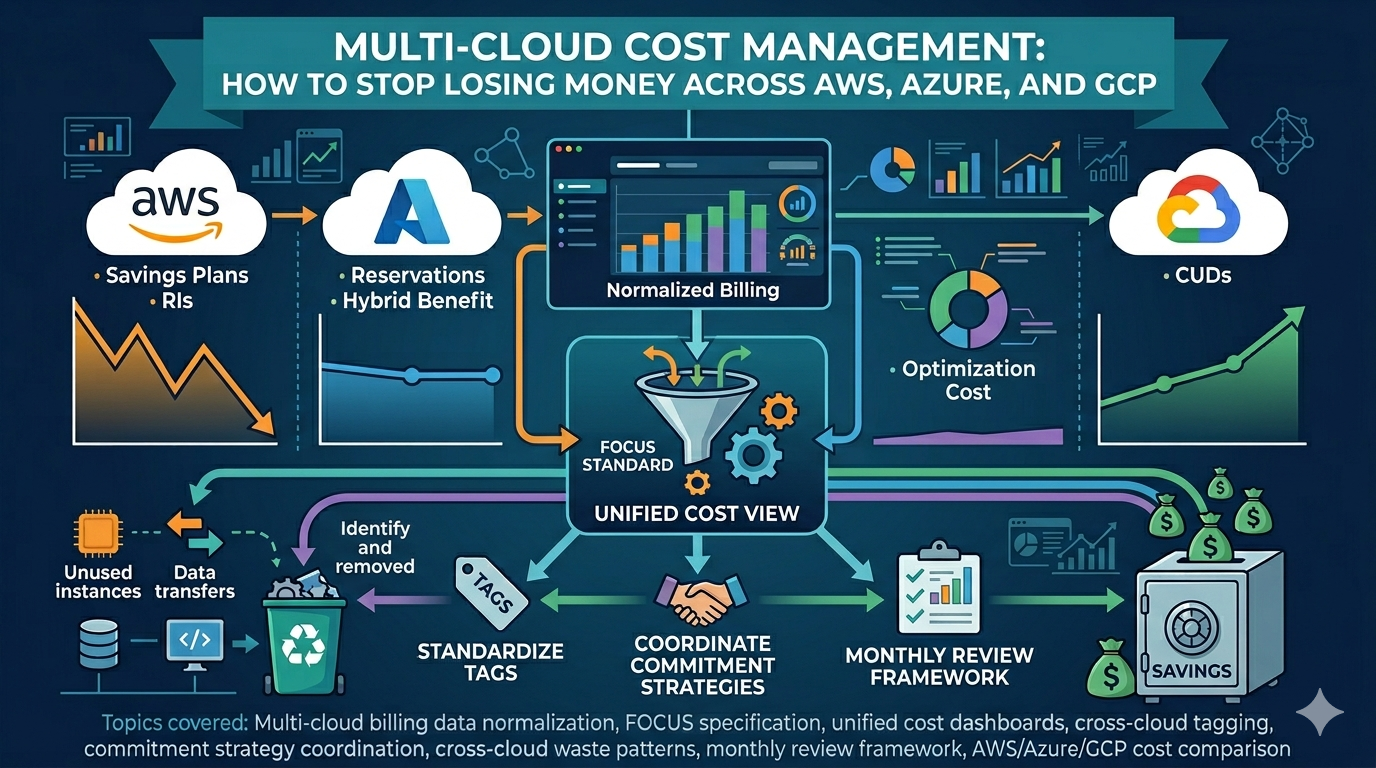
Multi-cloud cost management has a deceptively simple answer: four practices done consistently. Normalize AWS, Azure, and GCP billing data using the FOCUS specification, land it in a single warehouse, standardize a small set of tags across all three providers, and coordinate commitment decisions in one quarterly review instead of letting each cloud team buy independently. Skip any of those four and the cross-cloud total is where the waste hides.
This guide walks through each step with the specific FOCUS columns, tag schema, and quarterly-review structure that consistently help teams get multi-cloud spend under control.
Why Multi-Cloud Cost Management Is Harder Than Single-Cloud
Before jumping into solutions, it helps to understand why multi-cloud costs are specifically harder to manage than costs on a single provider. It is not just "more of the same problem."
- Every provider speaks a different billing language. AWS has Cost and Usage Reports with 100+ columns. Azure has Cost Management exports with a completely different schema. GCP has BigQuery billing exports with its own structure. The same concept (a compute discount commitment) is called a Savings Plan in AWS, a Savings Plan or Reservation in Azure, and a Committed Use Discount in GCP. Comparing them requires translation.
- Native tools only see their own cloud. AWS Cost Explorer, Azure Cost Management, and GCP Billing Console are all decent tools for their own provider. None of them can show you a unified view across providers. You end up with three dashboards, three alert systems, and three separate optimization workflows.
- Tagging is not portable. Even if you have perfect tagging discipline in one cloud, the tag keys, values, and enforcement mechanisms are different in each provider. A tag called
teamin AWS might be a label calledteamin GCP and a tag calledCostCenterin Azure. Reconciling these manually is tedious and error-prone. - Discount strategies conflict. A Savings Plan in AWS covers compute spend flexibly across instance types and regions. A Committed Use Discount in GCP locks you to a specific machine type in a specific region. Making commitment decisions in isolation means you might over-commit in one cloud while leaving money on the table in another.
- Nobody owns the total number. In most organizations, each cloud has its own team or at least its own cost champion. But nobody owns the cross-cloud total. That gap is where the waste hides.
Step 1: Normalize Your Billing Data
The single most important step in multi-cloud cost management is getting all your billing data into the same format. Without this, every analysis requires manual translation and every report is a one-off effort.
The FOCUS Standard
The FinOps Foundation created the FOCUS specification (FinOps Open Cost and Usage Specification) specifically to solve this problem. FOCUS defines a common schema for cloud billing data so that AWS, Azure, and GCP cost records can be compared side by side using the same column names and definitions.
The key columns that matter for multi-cloud analysis:
| FOCUS Column | What It Tells You | AWS Equivalent | Azure Equivalent | GCP Equivalent |
|---|---|---|---|---|
| BilledCost | What you actually owe | line_item_unblended_cost | CostInBillingCurrency | cost |
| EffectiveCost | Cost after amortized discounts | Derived from amortized columns | Derived from amortized columns | Derived from credits array |
| ServiceName | Which service generated the cost | product_servicename | MeterCategory | service.description |
| RegionId | Where the resource runs | product_region | ResourceLocation | location.region |
| ChargeCategory | Usage, purchase, tax, or credit | line_item_type (mapped) | ChargeType (mapped) | Derived from cost type |
| CommitmentDiscountId | Which commitment covers this | savingsPlanARN / reservationARN | BenefitId | commitment_discount fields |
The Reality of FOCUS Adoption
Here is the honest picture: AWS supports FOCUS v1.2 natively if you enable CUR 2.0 with FOCUS columns. GCP supports FOCUS v1.0 through its billing export. Azure is adding FOCUS support progressively. The versions do not perfectly align, and some columns require manual derivation depending on the provider.
This does not mean you should wait. The practical approach is to build a thin mapping layer per provider that normalizes raw billing exports into a common FOCUS-aligned schema. Start with the six columns above, which cover roughly 80% of what you need for cost visibility, allocation, and trend analysis. Add the remaining columns incrementally as your analysis needs grow.
Where to Land the Data
The normalized data needs to live somewhere you control. This is critical because your cloud provider's billing portal is not a reliable long-term data store. AWS has wiped CUR records for entire regions during billing corrections, leaving customers with no audit trail for the affected period. If your only copy of cost data lives inside the provider's own tools, you are one billing adjustment away from losing visibility into what happened.
Land your normalized billing exports in a data warehouse you own. BigQuery, Snowflake, or even a well-organized set of Parquet files in cloud storage will work. The point is that you control the retention, the schema, and the query access.
Step 2: Build a Unified Cost View
Once your billing data is normalized and landed in one place, you can build a single view that answers the questions finance and leadership actually ask.
The Questions a Multi-Cloud View Must Answer
Before building dashboards, define the questions. These are the ones that come up in every multi-cloud organization:
- Total cloud spend this month vs last month vs budget. Across all providers, in one number.
- Spend by provider. How much goes to AWS vs Azure vs GCP, and is the split changing?
- Spend by team or business unit. Which teams are driving growth? This requires tags, which we cover in Step 3.
- Top 10 cost drivers. Which specific services or workloads account for most of the spend?
- Commitment coverage. What percentage of eligible spend is covered by discounts (Savings Plans, Reservations, CUDs) across all providers?
- Month-over-month trend by service. Where is spend growing fastest?
Keep It Simple
The temptation with multi-cloud dashboards is to build something comprehensive that covers every dimension. Resist this. A dashboard with 30 panels that nobody checks is worse than a single-page summary that the VP of Engineering reviews every Monday.
Start with one page: total spend, split by provider, split by team, and a trend line. If that page gets used, add detail. If it does not get used, adding more panels will not fix the problem.
Step 3: Standardize Tags Across Providers
Tags (or labels, in GCP's terminology) are the foundation of cost attribution. In a multi-cloud environment, tagging becomes both more important and more difficult because each provider has its own tagging system with different rules.
Define a Universal Tag Schema
Pick a small set of tags that every resource across every provider must have:
| Tag Key | Purpose | Example Values |
|---|---|---|
environment | Separate prod from non-prod | production, staging, dev |
team | Cost attribution to teams | platform, data, ml |
service | Which application or workload | customer-api, etl-pipeline |
owner | Accountability | [email protected] |
Team in AWS, team in GCP, and CostCenter in Azure for the same concept. That inconsistency is what makes cross-cloud reports break.
Enforce Tags in Each Provider
Each cloud has its own mechanism for tag enforcement:
- AWS: Use AWS Organizations Tag Policies to define allowed tag keys and values, and Service Control Policies to deny resource creation without required tags.
- Azure: Use Azure Policy with the built-in "Require a tag and its value on resources" definition. Set it to Deny mode so untagged resources cannot be created.
- GCP: Use Organization Policy constraints combined with Terraform or CI/CD checks. GCP's native label enforcement is weaker than AWS and Azure, so you may need to rely on infrastructure-as-code guardrails.
Step 4: Coordinate Your Commitment Strategy
Every major cloud provider offers discounts for committing to a certain level of usage over one or three years. The names and mechanics differ, but the principle is the same: trade flexibility for a lower rate.
The Discount Landscape
| Concept | AWS | Azure | GCP |
|---|---|---|---|
| Flexible compute commitment | Compute Savings Plans | Compute Savings Plans | N/A (no equivalent) |
| Instance-specific commitment | EC2 Reserved Instances | Reserved VM Instances | Committed Use Discounts |
| Spend-based commitment | N/A | N/A | Spend-based CUDs |
| License reuse | N/A | Azure Hybrid Benefit | N/A |
| Interruptible discount | Spot Instances (60-90% off) | Spot VMs (60-90% off) | Spot VMs (60-91% off) |
Why You Need a Cross-Cloud View for Commitments
The most common mistake in multi-cloud commitment planning is making decisions in isolation. Each cloud team buys their own reservations based on their own usage patterns, and nobody looks at the total commitment exposure.
This creates two risks:
Over-commitment in aggregate. You might have 80% commitment coverage in AWS and 75% in Azure, which sounds healthy. But if your workload is gradually shifting from AWS to Azure (which happens more often than people admit), those AWS commitments become waste as utilization drops below the committed level.
Under-commitment where it matters most. Meanwhile, GCP spend might be growing 20% month over month with zero commitments because the GCP team is small and nobody asked them about CUDs. That is the cloud where commitment discounts would have the highest impact right now.
A Practical Approach
Review commitments quarterly across all providers in the same meeting. Look at:
- Current commitment coverage per provider. What percentage of eligible spend is covered?
- Utilization of existing commitments. Are you actually using what you already bought?
- Workload migration trends. Is spend shifting between providers? If yes, avoid long-term commitments on the provider that is losing workloads.
- Upcoming expirations. Which commitments are expiring in the next 90 days? Renew, resize, or let them lapse based on current usage.
Step 5: Find Cross-Cloud Waste Patterns
Some waste patterns are unique to individual clouds (see our AWS cost optimization guide and Azure cost optimization guide for provider-specific strategies). But multi-cloud environments also create waste patterns that only become visible when you look across providers.
Duplicate Services Across Clouds
The most expensive multi-cloud waste pattern is running the same workload in multiple clouds without realizing it. This happens more often than you would think, especially after mergers, acquisitions, or when teams pick their preferred cloud independently.
Common examples:
- Two separate data warehouses (BigQuery in GCP and Redshift in AWS) storing overlapping datasets
- Monitoring and logging in both CloudWatch (AWS) and Log Analytics (Azure) for workloads that could use a single observability stack
- Container orchestration clusters in multiple clouds running similar microservices with no architectural reason for the split
The fix is not always consolidation. Sometimes there is a legitimate reason for multi-cloud redundancy. But you need to know it is happening so you can make that decision intentionally rather than paying for it accidentally.
Non-Production Environments Running 24/7 Across Multiple Clouds
If non-production environments running around the clock is the number one waste pattern in a single cloud, it is even worse in multi-cloud because the total hidden cost multiplies. Dev and staging environments in AWS, Azure, and GCP all running 24/7 can easily account for 30 to 40% of your total cloud bill across all providers.
Implement scheduling policies consistently across all clouds. Shut down non-production compute outside business hours. The tooling differs per provider, but the policy should be the same everywhere.
Data Transfer Between Clouds
Moving data between cloud providers is expensive. Egress charges from any cloud provider are significantly higher than ingress, and if you have workloads that regularly shuttle data between AWS and GCP (or any other combination), those transfer costs can become a major line item that nobody notices because it is split across multiple invoices.
Audit your cross-cloud data flows. If you find high-volume transfers, evaluate whether the architecture could be restructured to keep the data closer to the compute that processes it.
Step 6: Monthly Multi-Cloud Cost Review
A monthly review framework keeps multi-cloud costs from drifting. Without a regular cadence, optimizations decay as teams change things, new projects launch, and nobody re-checks the baseline.
Week 1: Total Cost and Trend Review
- Pull the unified cost view you built in Step 2
- Compare total spend to budget and to last month
- Flag any provider where spend grew more than 10% month over month
- Check commitment utilization across all providers
Week 2: Team and Workload Attribution
- Review spend by team using your standardized tags
- Identify the top 3 teams driving cost growth
- Check for untagged resources across all providers (this is your attribution gap)
Week 3: Provider-Specific Optimization
- Rotate focus: AWS one month, Azure the next, GCP the third
- Run through the provider-specific optimization checklist (right-sizing, idle resources, storage tiers)
- This is where the single-cloud guides (AWS, Azure) come in
Week 4: Commitment Review and Forward Planning
- Review commitment expirations for the next 90 days
- Assess whether workload distribution across providers is changing
- Decide on new commitments, renewals, or conversions
- Document decisions so next month's review has context
Common Mistakes to Avoid
- Buying a multi-cloud cost management platform before having clean data. No tool will save you if your tagging is inconsistent and your billing exports are not normalized. Fix the data foundation first, then evaluate whether you need a platform.
- Optimizing each cloud in isolation. Provider-specific optimization is necessary but not sufficient. The cross-cloud patterns (duplicate services, conflicting commitments, uncoordinated scheduling) only become visible when you look at the total picture.
- Treating multi-cloud as a cost problem instead of a data problem. The reason multi-cloud costs are hard to manage is not that the bills are high. It is that the data is fragmented. Once you solve the data problem (normalization, tagging, unified view), the cost problem becomes much more tractable.
- Over-investing in commitment discounts without cross-cloud visibility. Commitment decisions made in isolation can create waste when workloads shift between providers. Always review commitments in the context of your total cloud portfolio.
- Letting each team pick their own tools. If the AWS team uses Cost Explorer, the Azure team uses Cost Management, and the GCP team uses Billing Console, nobody has the full picture. Standardize on a single analytics layer that spans all providers.
- Ignoring data transfer costs between clouds. Cross-cloud egress is one of the fastest-growing and least-visible cost categories in multi-cloud environments. Track it explicitly. For a deep dive on the GCP side of egress pricing and how it compounds, see GCP Network Egress and Cross-Region Costs.
- Waiting for perfect FOCUS adoption before starting. The FOCUS standard is not fully mature yet, and provider support varies. But normalizing even a subset of columns today gives you a foundation to build on. Perfect is the enemy of useful.
Getting Started
If you are managing costs across multiple clouds and do not know where to start, here is a practical sequence:
- Export billing data from every provider. Enable CUR 2.0 (with FOCUS columns) in AWS, set up Cost Management exports in Azure, and enable BigQuery billing export in GCP. This takes an afternoon.
- Normalize the data. Build or adopt a mapping layer that translates each provider's billing schema into a common format. Start with six columns: BilledCost, EffectiveCost, ServiceName, RegionId, ChargeCategory, and CommitmentDiscountId.
- Land it in one warehouse. Pick a data warehouse you control. BigQuery is a natural choice if you are already on GCP, but any warehouse works.
- Standardize your tags. Define four to five mandatory tags, enforce them in every provider, and start tracking the percentage of spend that is properly attributed.
- Build a one-page cost summary. Total spend, by provider, by team, with a trend line. Get this in front of leadership monthly.
- Review commitments quarterly. Look at all providers in the same meeting. Check coverage, utilization, expirations, and workload migration trends.
This is part of our cloud cost optimization series. See also: AWS Cost Optimization Guide and Azure Cost Optimization Guide.
Related Articles: