
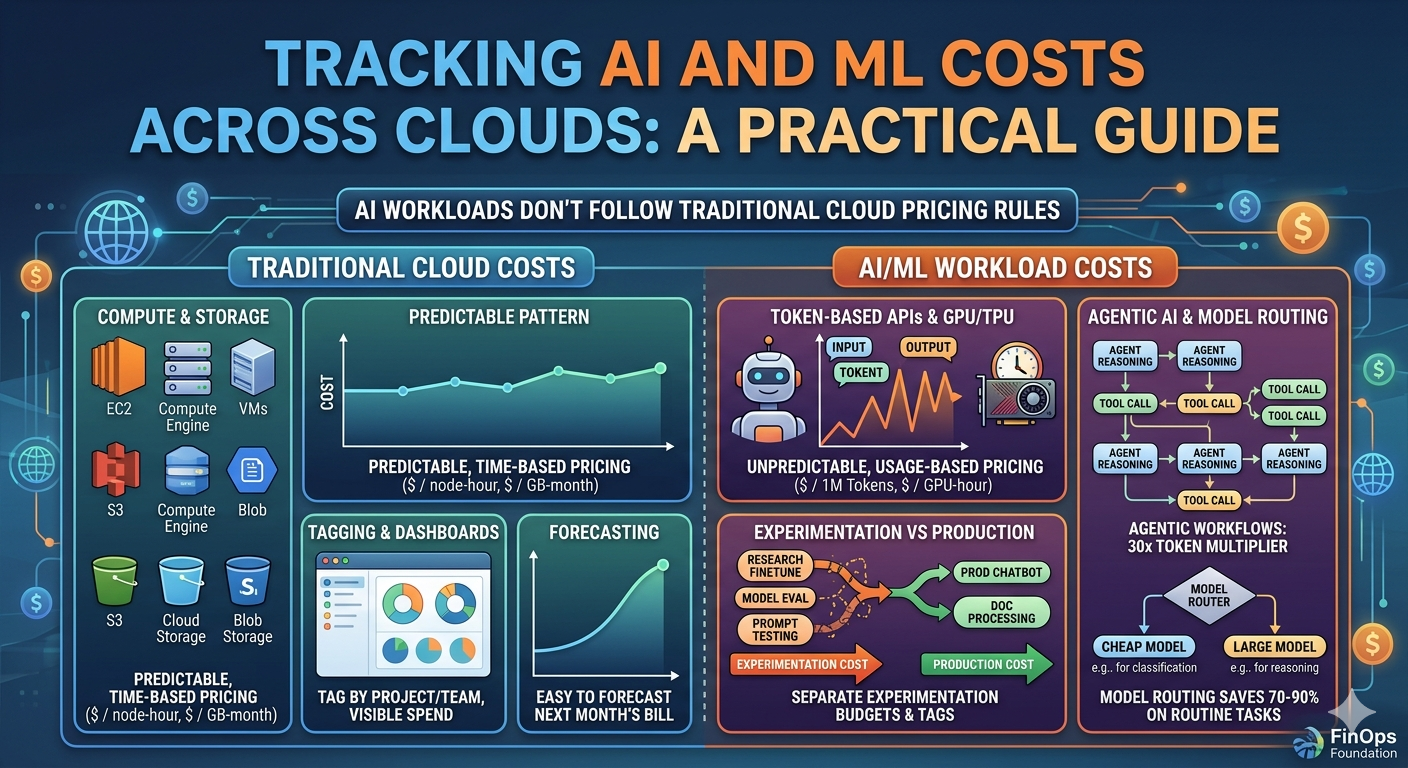
AI workloads are fundamentally different from traditional cloud workloads when it comes to cost. A web application consumes compute and storage in predictable patterns. An AI workload consumes tokens, GPU hours, training cycles, and inference calls in patterns that are anything but predictable.
That difference matters because most cost management practices were designed for the traditional model. Your existing tagging strategy, your billing dashboards, your alerting thresholds were all built for a world where compute and storage are the primary cost drivers. AI spend doesn't fit neatly into those categories, and if you're running AI workloads across multiple cloud providers, the problem compounds quickly.
This guide covers where AI costs actually live in AWS, GCP, and Azure, why they're hard to track with standard tools, and what to do about it. If you've already read our GCP-specific AI cost tracking guide, this article expands the same practical approach to all three major clouds.
Why AI Costs Don't Follow Traditional Cloud Pricing Rules
Traditional cloud costs are based on time and capacity. You pay for an EC2 instance by the hour. You pay for Cloud Storage by the gigabyte-month. The pricing is predictable, the units are intuitive, and you can forecast next month's bill based on current usage patterns.
AI costs break that model in several ways.
Token-based pricing is usage-dependent, not time-dependent
When you call Gemini, Claude, or GPT-4 through a cloud API, you pay per token processed. A token is roughly four characters. The cost depends on how much text you send in (input tokens) and how much text comes back (output tokens). Output tokens typically cost 3 to 8 times more than input tokens.
This means two API calls to the same model can cost dramatically different amounts depending on prompt length and response length. A short classification request might cost a fraction of a cent. A long document summarization might cost several dollars. The infrastructure is the same. The cost is not.
GPU and TPU compute is expensive and bursty
Training a custom model or fine-tuning an existing one requires GPU or TPU instances that cost $2 to $40 per hour depending on the accelerator type. A training job that runs for eight hours on a cluster of four A100 GPUs can easily cost $500 or more. And because training jobs are often experimental (run it, check results, adjust hyperparameters, run again), these costs are hard to forecast.
Inference compute follows a different pattern. If you deploy a model to an endpoint for real-time serving, you pay for the GPU instance whether or not anyone is calling it. An idle endpoint with an A100 GPU costs the same as a busy one.
The experimentation versus production split
This is where the real cost management challenge lives. Most AI teams are running experiments alongside production workloads. The experiment that tests a new prompt template costs tokens. The experiment that fine-tunes a model on a new dataset costs GPU hours. The experiment that evaluates five different models costs all of the above, multiplied by five.
Without clear separation between experimentation and production costs, you cannot answer basic questions like "how much does our AI product actually cost to run" versus "how much are we spending to improve it." That distinction matters for pricing decisions, margin calculations, and budgeting.
Agentic AI is a cost multiplier
A single chatbot interaction might use a few thousand tokens. An agentic AI workflow, where models call tools, reason through multi-step plans, and iterate on results, can use roughly 30 times more tokens than a simple chatbot exchange. As organizations move from chatbots to agents, token costs scale dramatically. Combined with expanding context windows that can 10 times the per-request cost, the economics of generative AI are shifting faster than most teams realize.
The FinOps Foundation reported that 98% of FinOps teams now manage AI spend, up from just 31% two years ago. AI cost management went from a niche concern to a universal one almost overnight.
Where AI Costs Hide in Each Cloud
The biggest obstacle to tracking AI costs is that they don't show up in billing data under a single "AI" category. Instead, they're scattered across multiple services, each with its own pricing model and SKU naming conventions.
AWS
| Service | What It Covers | How It's Billed |
|---|---|---|
| Amazon Bedrock | API calls to Claude, Llama, Titan, Stable Diffusion, and other foundation models | Per input/output token, or provisioned throughput |
| Amazon SageMaker | Model training, endpoint hosting, processing jobs, notebooks | Per instance-hour (GPU), per inference request, per processing job |
| EC2 GPU Instances | Self-managed model training and serving (p4d, p5, g5, g6 families) | Per instance-hour |
| S3 | Training data, model artifacts, pipeline outputs | Per GB stored, per request |
| Data Transfer | Moving data between services, regions, or out to the internet | Per GB transferred |
| AWS Trainium/Inferentia | Custom chips for training and inference (trn1, inf2 instances) | Per instance-hour |
The hidden cost trap: SageMaker endpoints that stay running overnight or through weekends. A single ml.g5.xlarge endpoint costs roughly $1.40 per hour, so a forgotten endpoint burns about $1,000 per month. Multiply by the number of developers on your team who each have their own test endpoint, and it adds up fast.
GCP
| Service | What It Covers | How It's Billed |
|---|---|---|
| Vertex AI Generative AI | Gemini API, Imagen, embeddings | Per input/output token (varies by model and context length) |
| Vertex AI | Custom model training, prediction endpoints, pipelines, AutoML | Per node-hour (GPU/TPU), per prediction |
| Cloud AI APIs | Vision, Natural Language, Translation, Speech-to-Text | Per API call or per unit processed |
| Compute Engine | GPUs/TPUs attached to VMs for self-managed workloads | Per GPU-hour, per TPU-hour |
| Cloud Storage | Training data, model artifacts | Per GB stored, per operation |
For a deep dive into GCP-specific AI cost tracking, including BigQuery queries and labeling strategies, see our GCP AI Cost Tracking Guide.
Azure
| Service | What It Covers | How It's Billed |
|---|---|---|
| Azure OpenAI Service | GPT-4, GPT-4o, o1, DALL-E, Whisper, embeddings | Per 1,000 tokens (input and output priced separately), or provisioned throughput units (PTUs) |
| Azure Machine Learning | Model training, managed endpoints, compute clusters, pipelines | Per compute-hour, per managed endpoint hour |
| GPU Virtual Machines | NC, ND, NV series VMs for self-managed workloads | Per VM-hour |
| Azure AI Services (Cognitive Services) | Vision, Speech, Language, Decision APIs | Per API transaction |
| Azure Storage | Training data, model files | Per GB stored, per transaction |
The hidden cost trap: Azure OpenAI PTU commitments that were sized for peak usage but average utilization is only 30 to 40%. This is the AI equivalent of over-provisioned reserved instances.
The Labeling and Tagging Problem
Even if you know which services to look at, attributing AI costs to specific projects, teams, or use cases is hard. The core issue is that AI costs flow through generic service names.
Consider a team that runs three different AI workloads:
- A customer-facing chatbot using a foundation model API
- A document processing pipeline using custom vision and NLP models
- An internal research project fine-tuning a language model
What to label
At minimum, every AI resource should carry these labels or tags:
| Label/Tag | Purpose | Example Values |
|---|---|---|
ai-workload | Identifies the specific AI use case | chatbot, doc-processing, research-finetune |
environment | Separates experimentation from production | prod, staging, experiment |
model | Tracks which model is being used | gemini-2.5-pro, claude-sonnet, gpt-4o |
team | Cost allocation | ml-platform, product, research |
environment tag is especially important for the experimentation versus production split discussed earlier. Without it, you cannot calculate the actual production cost of your AI features.
The cross-cloud labeling consistency problem
AWS calls them tags. GCP calls them labels. Azure calls them tags. The enforcement mechanisms are different in each cloud.
In AWS, you can use Service Control Policies and Tag Policies to enforce required tags. In GCP, you can use Organization Policy constraints to require labels. In Azure, you can use Azure Policy to enforce tag requirements. But none of these systems talk to each other, and a tag called ai-workload in AWS is not automatically related to a label called ai-workload in GCP.
The solution is to define a cross-cloud tagging standard as part of your FinOps practice and enforce it through infrastructure-as-code templates (Terraform modules, CloudFormation templates, or Bicep modules) rather than relying on manual compliance. If every AI resource is deployed through a module that requires ai-workload, environment, and team labels, you get consistency without relying on developer discipline.
For more on cross-cloud tagging strategies, see our Multi-Cloud Cost Management Guide.
Practical Strategies for Controlling AI Costs
Tracking costs is only useful if it leads to action. Here are the strategies that consistently reduce AI spend without sacrificing capability.
1. Model routing: use the cheapest model that works
Not every request needs the most capable model. A simple text classification task doesn't need GPT-4o or Gemini 2.5 Pro. A smaller, cheaper model often produces identical results for routine tasks.
The concept is straightforward: route each request to the least expensive model that meets the quality threshold for that task. In practice, this means:
- Define quality thresholds per use case. A customer-facing summarization might require 95% accuracy. An internal log classification might only need 80%.
- Benchmark models against your actual data. Run your test suite against multiple models and compare cost per correct response, not just cost per token.
- Implement a routing layer. Start simple. Route by task type (classification goes to the small model, reasoning goes to the large model) and add dynamic routing based on prompt complexity later.
2. Prompt optimization reduces token costs directly
Every unnecessary token in your prompt costs money. This sounds obvious, but in practice, prompts accumulate context, examples, and instructions over time without anyone auditing the total token count.
Concrete optimization steps:
- Audit prompt lengths monthly. Track the average input token count per endpoint. If it's growing, investigate why.
- Trim system prompts. Many system prompts contain redundant instructions or examples that could be reduced without affecting output quality.
- Use structured output formats. Requesting JSON output instead of prose typically produces shorter responses (fewer output tokens) and is easier to parse.
- Compress context. For retrieval-augmented generation (RAG) pipelines, summarize retrieved documents before injecting them into the prompt rather than passing full text.
3. Batch inference versus real-time inference
Real-time inference (synchronous API calls) is the default for most applications. But many AI workloads don't actually need real-time responses.
- Document processing pipelines can queue documents and process them in batch during off-peak hours.
- Content generation for email campaigns or social media can run as a nightly batch job.
- Data enrichment (classifying records, extracting entities) is a batch workload by nature.
The tradeoff is latency. If your use case can tolerate minutes or hours of delay instead of milliseconds, batch is almost always cheaper.
4. Caching reduces redundant API calls
Many AI applications send the same or very similar prompts repeatedly. Customer support chatbots often handle the same questions. Document processing pipelines process documents with similar structures. Classification tasks often see the same input patterns.
Implementing a semantic cache (where similar prompts return cached results instead of making a new API call) can eliminate 20 to 40% of API calls depending on the workload.
The implementation approach:
- Hash the prompt (or a normalized version of it) and check a cache before calling the model.
- For semantic similarity caching, generate an embedding of the prompt and check for similar cached entries within a cosine similarity threshold.
- Set TTLs (time-to-live) based on how quickly your data changes. Static classification tasks can cache for days. Dynamic summarization might cache for hours.
5. Separate experimentation budgets
The most impactful organizational strategy is giving experimentation its own budget, separate from production. This does three things:
- Makes production costs visible. When research costs are mixed with production, you can't calculate margins or per-customer costs accurately.
- Creates natural cost discipline for experiments. A team with a $2,000 monthly experiment budget will naturally optimize their experiments. A team charging everything to a shared AI account will not.
- Enables apples-to-apples comparison. If your production AI costs grew 40% last month, you need to know whether that was driven by more customers (good) or by a prompt change that doubled token usage (fixable).
environment tag discussed earlier. Every AI resource is tagged as prod, staging, or experiment. Budget alerts fire when experiment spend exceeds the allocated amount.
6. Shut down idle inference endpoints
This applies to SageMaker endpoints, Vertex AI endpoints, and Azure ML managed endpoints. Unlike serverless API calls (Bedrock, Vertex AI Generative AI, Azure OpenAI pay-per-token), managed endpoints run on dedicated compute that you pay for continuously.
Build automation that:
- Scales endpoints to zero during non-business hours (if your use case allows).
- Alerts on endpoints with zero or near-zero traffic for more than 24 hours.
- Automatically deletes development endpoints after a configurable TTL (48 hours is a reasonable default).
Building a Cross-Cloud AI Cost Dashboard
Once you have billing data flowing and labels applied, you need a way to see everything in one place. Here is a practical approach using billing exports from all three providers.
Step 1: Export billing data from each cloud
All three providers support exporting billing data to a queryable format:
- AWS: Cost and Usage Report (CUR) exported to S3, queryable via Athena or loaded into BigQuery/Redshift.
- GCP: Billing export to BigQuery (native, near real-time).
- Azure: Cost Management exports to Azure Storage, queryable via Azure Data Explorer or loaded into BigQuery/Snowflake.
Step 2: Normalize to a common schema
Use the FOCUS standard to normalize billing data from all three providers into a common schema. The key columns for AI cost tracking:
-- Unified AI cost view using FOCUS-normalized data
SELECT
  provider,
  service_name,
  COALESCE(tags['ai-workload'], labels['ai-workload'], 'untagged') AS ai_workload,
  COALESCE(tags['environment'], labels['environment'], 'unknown') AS environment,
  COALESCE(tags['model'], labels['model'], 'unknown') AS model,
  SUM(billed_cost) AS total_billed,
  SUM(effective_cost) AS total_effective
FROM unified_billing
WHERE service_category = 'AI and Machine Learning'
  AND billing_period = '2026-04'
GROUP BY provider, service_name, ai_workload, environment, model
ORDER BY total_effective DESC;
Step 3: Build the views that matter
For a cross-cloud AI cost dashboard, you need at minimum these views:
1. Total AI spend by provider and service
This is your top-level view. How much are you spending on AI in each cloud, and which services are driving the cost?
SELECT
  provider,
  service_name,
  SUM(effective_cost) AS monthly_cost,
  ROUND(SUM(effective_cost) / SUM(SUM(effective_cost)) OVER () * 100, 1) AS pct_of_total
FROM unified_billing
WHERE service_category = 'AI and Machine Learning'
  AND billing_period = '2026-04'
GROUP BY provider, service_name
ORDER BY monthly_cost DESC;
2. Experimentation versus production split
This view answers "how much of our AI spend is production cost versus R and D?"
SELECT
  COALESCE(tags['environment'], 'untagged') AS environment,
  provider,
  SUM(effective_cost) AS monthly_cost
FROM unified_billing
WHERE service_category = 'AI and Machine Learning'
  AND billing_period = '2026-04'
GROUP BY environment, provider
ORDER BY monthly_cost DESC;
3. Cost per model
Which models are you spending the most on? This is where model routing decisions get validated.
SELECT
  COALESCE(tags['model'], 'unknown') AS model,
  provider,
  SUM(effective_cost) AS monthly_cost,
  COUNT(*) AS usage_records
FROM unified_billing
WHERE service_category = 'AI and Machine Learning'
  AND billing_period = '2026-04'
GROUP BY model, provider
ORDER BY monthly_cost DESC;
4. Cost per AI workload
The most actionable view. Which AI use cases are driving spend?
SELECT
  COALESCE(tags['ai-workload'], 'untagged') AS workload,
  SUM(CASE WHEN provider = 'AWS' THEN effective_cost ELSE 0 END) AS aws_cost,
  SUM(CASE WHEN provider = 'GCP' THEN effective_cost ELSE 0 END) AS gcp_cost,
  SUM(CASE WHEN provider = 'Azure' THEN effective_cost ELSE 0 END) AS azure_cost,
  SUM(effective_cost) AS total_cost
FROM unified_billing
WHERE service_category = 'AI and Machine Learning'
  AND billing_period = '2026-04'
GROUP BY workload
ORDER BY total_cost DESC;
Step 4: Set up alerts
Cost alerts for AI workloads should be more aggressive than traditional cloud alerts, because AI costs can spike much faster. A prompt change that doubles token usage, a training job with wrong hyperparameters, or a traffic spike to a model endpoint can all cause costs to jump within hours, not days.
Recommended alert thresholds:
| Alert | Threshold | Why |
|---|---|---|
| Daily AI spend exceeds 2x rolling average | Immediate | Catch runaway costs before they accumulate |
| Experiment environment exceeds monthly budget | At 80% of budget | Stop surprise experiment costs |
| Any single model costs more than 50% of total AI spend | Weekly check | Concentration risk; consider model routing |
| Untagged AI spend exceeds 10% of total | Weekly check | Labeling compliance is slipping |
The Cost Separation Framework
Putting it all together, here is the framework for managing AI costs across clouds:
1. Discover all AI-related services and SKUs in each cloud. Don't rely on service categories alone. GPU compute, storage for model artifacts, and data transfer are all AI costs that hide under non-AI service names.
2. Label every AI resource with workload, environment, model, and team tags. Enforce this through infrastructure-as-code, not policies that developers can forget.
3. Normalize billing data from all three clouds into a common schema using FOCUS. Without normalization, cross-cloud analysis requires manual effort every time.
4. Separate experimentation from production costs. This single split makes every other analysis more meaningful.
5. Optimize using model routing, prompt optimization, batch inference, caching, and idle endpoint cleanup. These are the levers that reduce AI costs without reducing capability.
6. Alert aggressively. AI costs move faster than traditional cloud costs, and your alerting should reflect that.
What Makes AI Cost Management Harder Than Traditional FinOps
If you already have a solid FinOps practice for traditional cloud costs, adding AI costs to the mix introduces a few new challenges worth calling out.
The unit economics are unfamiliar. Your finance team understands dollars per server-hour. They don't yet understand dollars per million tokens or the difference between input and output token pricing. Building literacy around AI pricing models across the organization takes deliberate effort.
Costs scale with usage, not infrastructure. Traditional cloud costs scale with how many servers you run. AI costs (for API-based models) scale with how much you use them. This makes forecasting harder because usage depends on customer behavior and product decisions, not infrastructure provisioning.
Model pricing changes frequently. Cloud providers regularly adjust model pricing, often dropping prices as newer and cheaper models become available. A cost analysis from three months ago might be significantly off because the price per token for your primary model dropped by 50%. This is mostly good news, but it means your forecasts need frequent updating.
The cost of doing nothing is high. With traditional cloud resources, an idle server wastes money but the amount is bounded. With AI, a misconfigured agent that calls an expensive model in a loop can burn through thousands of dollars in minutes. The blast radius of mistakes is larger.
Related Resources
- AI Cost Tracking on GCP: Vertex AI and Gemini for GCP-specific queries and labeling strategies
- Multi-Cloud Cost Management Guide for broader multi-cloud FinOps practices
- AWS Cost Optimization Guide for AWS-specific savings strategies
- What Is FOCUS? The FinOps Standard for Cloud Billing for details on billing data normalization
Struggling to track AI costs across multiple cloud providers? Brain Agents AI helps teams optimize cloud spend across GCP, AWS, and Azure, without enterprise complexity or a dedicated FinOps team.