
Your FinOps team is drowning. AI agents can be the team they can't hire.
The capacity gap between what FinOps teams are expected to manage and what a fixed headcount can actually cover has widened faster than hiring can close it, and AI agents are the operational lever that absorbs the continuous monitoring and analysis load a small team no longer has hours for.
That is not a sales pitch. It is a description of what is happening inside cloud cost management teams right now. The scope of work has expanded dramatically over the past two years, team sizes have not kept up, and the gap between what FinOps teams are expected to manage and what they can actually handle is growing every quarter.
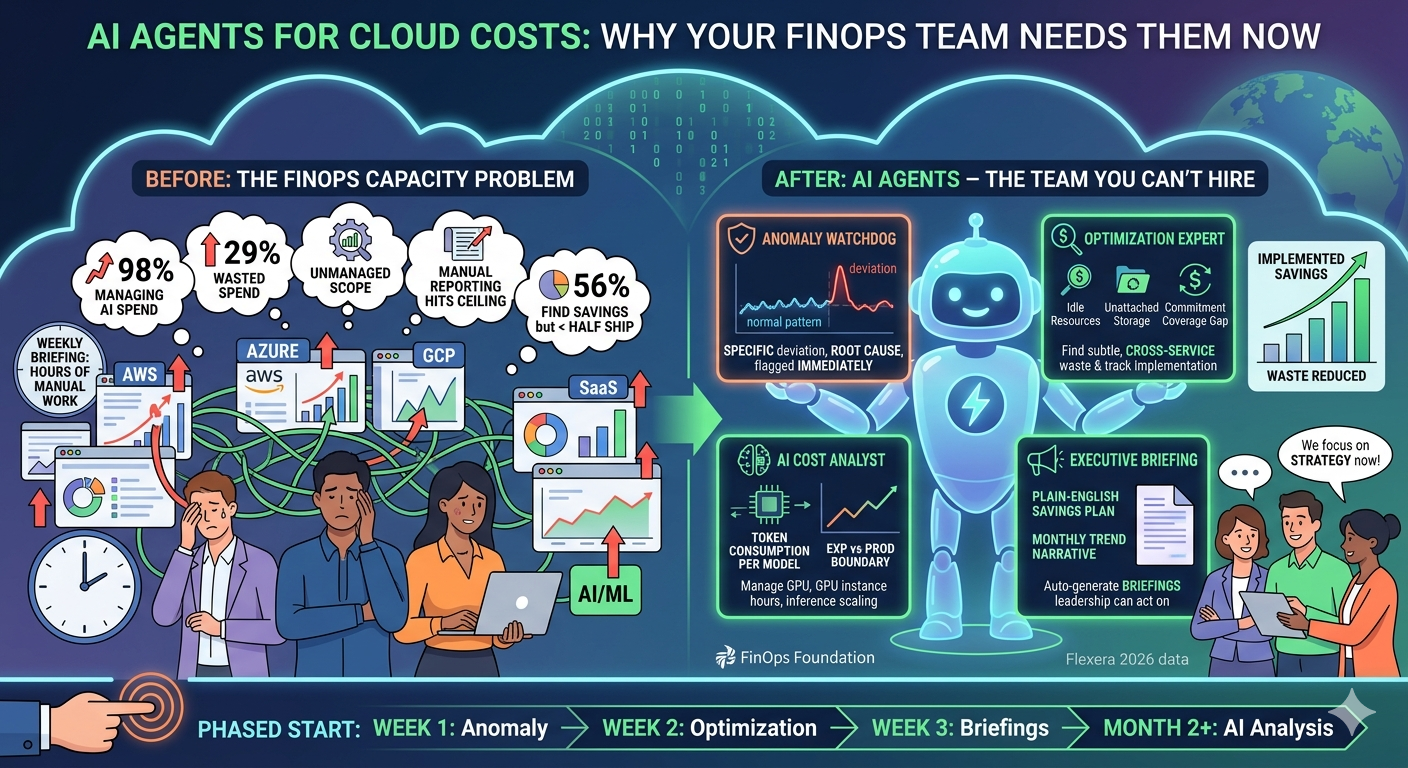
According to the State of FinOps 2026 report, 98% of FinOps teams now manage or plan to manage AI spend. Two years ago, that number was 31%. That is not gradual adoption. That is an explosion of new work landing on already busy teams. And AI spend is just one dimension. FinOps practitioners are now being asked to cover cloud infrastructure, SaaS licensing, data center costs, and software licensing, all with headcounts that were originally sized for "help us understand our AWS bill."
Meanwhile, Flexera's 2026 State of the Cloud report found that wasted cloud spend rose to 29%, and managing costs remains the number one challenge for 85% of organizations. The waste is not shrinking. It is growing alongside the complexity.
This article covers why FinOps teams are hitting a ceiling, how AI agents can handle the work that falls through the cracks, and what to look for if you are evaluating agent-based approaches to cloud cost management.
The FinOps Capacity Problem Is Structural
The problem is not that FinOps teams are bad at their jobs. The problem is that the job has grown four to five times in scope while the teams have stayed roughly the same size.
Consider what a FinOps practitioner was responsible for in 2023: cloud infrastructure costs across one or two providers. Reservations. Right-sizing recommendations. Budget alerts. Maybe some showback reporting. That was already a full plate.
Now look at what the same person is responsible for in 2026:
Cloud infrastructure across multiple providers, each with different billing models, discount structures, and native tooling. AI and ML workloads that burn through GPU hours and API tokens in patterns that look nothing like traditional compute. SaaS licensing for dozens of tools that each have their own pricing tiers and usage models. Data platform costs that scale with query volume, storage growth, and pipeline complexity. And increasingly, on-premises or hybrid costs that need to be compared against cloud alternatives.
That is not an incremental increase. That is a fundamentally different job description with the same number of people doing it.
The "Fund AI Through Savings" Trap
There is a particularly painful dynamic playing out right now. Many organizations have told their FinOps teams to fund new AI initiatives through the savings they find elsewhere in the cloud bill. The logic sounds reasonable: find waste, redirect those dollars to AI projects, and the AI investment pays for itself.
In practice, this creates a self-reinforcing loop that is almost impossible to escape. You need to save money to fund AI projects. But managing the costs of those AI projects is itself a massive new workload. The FinOps team is simultaneously expected to find savings and manage the spending of the very projects those savings are funding.
And AI workloads are not cheap to monitor. Agentic AI systems that chain multiple model calls together use roughly 30 times more tokens than simple chatbot interactions. That is not a typo. When an AI agent reasons through a multi-step task, calling models repeatedly, evaluating outputs, and iterating, the token consumption balloons compared to a single question-and-answer exchange. Even as model costs per token decline (some forecasts project 90% deflation by 2030), the sheer volume of token consumption in agentic workflows threatens to neutralize those savings entirely.
The result is that FinOps teams are being asked to do more work to generate more savings to fund more projects that create more work. Something has to give.
The Execution Gap
Even when FinOps teams identify optimization opportunities, they struggle to get them implemented. According to industry data, 56% of FinOps teams ship less than half the savings they find. The recommendations exist. The dashboards show the waste. But the actual work of right-sizing instances, cleaning up idle resources, adjusting reservation coverage, and renegotiating commitments requires engineering time that is always competing with feature work.
On the other side, 55% of developers ignore cost management tools entirely. They know the dashboards exist. They know there are recommendations waiting. They just do not have the time or incentive to act on them when they are under pressure to ship product features.
This is not a people problem. It is a capacity and prioritization problem. And it is exactly the kind of problem that benefits from automation that works around the clock, never forgets to follow up, and does not need to be convinced that cost optimization matters.
What AI Agents Actually Do for Cloud Costs
When most people hear "AI-powered cost optimization," they think of a dashboard with a chatbot bolted on. That is not what we are talking about. AI agents for cloud costs are autonomous software processes that monitor, analyze, and report on cloud spending continuously, without waiting for a human to ask the right question.
The difference between a traditional cost tool and an AI agent is the difference between a security camera and a security guard. The camera records everything but requires someone to review the footage. The guard watches, interprets, and acts. AI agents are closer to the guard.
Here is what that looks like in practice, broken into the specific roles that agents play:
The Anomaly Watchdog
Traditional cost alerting works on thresholds. You set a budget, and when spend crosses a percentage of that budget, you get an email. The problem is that threshold-based alerts are either too noisy (alerting on normal fluctuations) or too late (only firing after significant overspend has already occurred).
An AI agent that acts as an anomaly watchdog operates differently. It learns the normal spending patterns for each service, account, and project. It understands that your BigQuery costs spike every Monday when batch jobs run, that your Compute Engine spend drops on weekends when dev environments scale down, and that your storage costs grow linearly at a predictable rate.
When something deviates from those patterns, the agent flags it immediately. Not "your budget hit 80%," but "BigQuery costs in the analytics project jumped 340% compared to this time last week, driven by a new scheduled query that started running hourly instead of daily." That level of specificity is the difference between an alert you ignore and an alert you act on.
The practical outcome: see your first anomaly flagged within 24 hours of connecting your billing data. Not after weeks of configuration. Not after building custom dashboards. Within a day.
The Optimization Expert
Finding savings opportunities in cloud billing data requires a specific kind of analysis that most engineers do not have time to do regularly. An AI agent dedicated to optimization continuously scans for patterns that indicate waste or missed savings.
This includes the obvious targets: idle resources, oversized instances, unattached storage volumes, and unused reservations. But it also includes subtler opportunities that humans typically miss because they require correlating data across multiple services and time periods.
For example, an optimization agent might notice that a set of Compute Engine instances in a development project run 24/7 but only receive traffic between 8 AM and 6 PM on weekdays. A human reviewing the billing dashboard might see the line item but not connect it to the usage pattern without pulling separate metrics. The agent correlates both automatically and calculates the specific savings from scheduling those instances to shut down outside business hours.
Or it might identify that your commitment discount coverage dropped from 72% to 58% over the past quarter because new workloads were provisioned without corresponding reservation purchases. The agent does not just flag the gap. It calculates the specific commitment that would restore coverage, estimates the savings, and tracks whether the recommendation gets implemented.
The goal is not just finding savings. It is finding savings and making sure they do not get lost in a backlog that nobody reviews.
The AI Cost Analyst
AI and ML workloads have their own cost dynamics that traditional FinOps tooling handles poorly. Token-based pricing, GPU instance hours, model endpoint costs, training job expenses, and inference scaling all behave differently from standard compute and storage.
An AI cost analyst agent specializes in these patterns. It tracks token consumption per model, per application, and per environment. It identifies which AI features are cost-efficient and which ones are burning through budget disproportionately. It separates experimentation costs from production costs, which is critical because teams that experiment with large language models can easily spend more on testing than on serving actual users.
This separation matters more than most teams realize. Production AI workloads tend to be predictable: known models, known input patterns, known traffic volumes. Experimentation is the opposite: engineers testing new models, running evaluations on large datasets, and iterating on prompts in ways that generate unpredictable spikes. Without a clear boundary between the two, cost anomalies in experimentation get mixed with production trends, and nobody can tell whether costs are growing because the product is succeeding or because someone left a batch evaluation running over the weekend.
The agent also evaluates model routing opportunities. If your application uses a large, expensive model for every request, the agent identifies which request types could be handled by a smaller, cheaper model without degrading quality. Moving simple classification tasks from a flagship model to a lightweight alternative can reduce per-request costs by 70 to 90 percent for those specific calls.
The Executive Briefing
FinOps teams spend a disproportionate amount of time preparing reports. Weekly cost summaries, monthly trend analyses, quarterly business reviews. The data exists in dashboards, but translating raw numbers into a narrative that a VP of Engineering or CFO can act on takes hours of manual work every week.
An AI agent that generates executive briefings automates this entirely. It pulls the relevant data, identifies the key trends, highlights anomalies and their root causes, summarizes optimization progress, and delivers a plain-English summary on a regular schedule.
The practical outcome: get a plain-English savings plan before your first weekly briefing. Not a raw data dump. Not a dashboard link. A concise narrative that explains what happened with cloud costs this week, why, and what should happen next.
This matters because the communication bottleneck is often worse than the analysis bottleneck. FinOps teams frequently know exactly where the waste is. They just cannot get that information to the people who can authorize changes quickly enough.
Why Now, Specifically
AI agents for cloud costs are not a new concept. Various tools have claimed "AI-powered" cost optimization for years. But several things have changed in 2025 and 2026 that make agent-based approaches genuinely practical for the first time.
The Scope Explosion Demands Automation
The jump from 31% to 98% of FinOps teams managing AI spend is the clearest signal. That is not a gradual trend you can staff your way through. When the scope of work triples in two years and hiring timelines for specialized FinOps practitioners are three to six months, automation is not optional. It is the only way to close the gap.
Cloud Billing Data Is Finally Accessible
The FOCUS standard (FinOps Open Cost and Usage Specification) has matured to the point where AWS, GCP, and Azure billing data can be normalized into a common schema. This is a prerequisite for any cross-cloud agent. Without normalized data, an agent would need completely separate logic for each provider. With FOCUS, an anomaly detection agent can apply the same pattern recognition across all three clouds.
AWS supports FOCUS v1.2 natively through CUR 2.0. GCP supports FOCUS v1.0 through its billing export. Azure is progressively adding FOCUS support. The coverage is not perfect, but it is sufficient to build agents that work across providers without maintaining three completely separate analysis pipelines.
Foundation Models Can Reason About Cost Data
Earlier attempts at "AI cost optimization" were mostly rules engines with a marketing label. If spend exceeds X, alert. If utilization is below Y, recommend right-sizing. Useful, but not meaningfully different from the threshold-based tools they claimed to replace.
Current foundation models can do something qualitatively different. They can read a billing anomaly, correlate it with deployment logs, compare it to historical patterns, and generate an explanation in natural language. They can evaluate whether a savings recommendation makes sense in the context of upcoming capacity needs. They can draft an executive summary that explains cost trends in business terms rather than infrastructure jargon.
This does not mean the AI is perfect. It means the gap between "what an experienced FinOps practitioner would notice" and "what an AI agent notices" has narrowed enough that the agent catches the majority of what matters, especially the repetitive monitoring and analysis work that practitioners describe as their biggest time sink.
The Cost of Not Automating Is Now Quantifiable
With wasted cloud spend at 29% and FinOps teams shipping less than half the savings they identify, the cost of the status quo is measurable. If your organization spends $500,000 per month on cloud, roughly $145,000 of that is waste. If your FinOps team identifies $80,000 in monthly savings opportunities but only implements $35,000 of them, you are leaving $45,000 on the table every month, not because nobody found it, but because nobody had time to follow through.
An AI agent that improves the implementation rate from 44% to even 70% recovers that $45,000 gap. The ROI math is straightforward because the waste is already identified and quantified. The bottleneck is execution, and that is exactly what agents address.
What to Look for in an Agent-Based Approach
Not all "AI-powered" cost tools are created equal. If you are evaluating solutions, here are the characteristics that separate genuine agent-based approaches from dashboards with a chatbot layer.
Continuous Monitoring, Not On-Demand Analysis
An agent should be working when you are not. If you need to log into a dashboard and ask questions to get value, you have a tool, not an agent. The agent should be monitoring spending patterns, detecting anomalies, and tracking optimization progress around the clock, surfacing findings proactively rather than waiting for queries.
Specificity Over Generality
"Your cloud spend increased 15% this month" is a dashboard metric. "Cloud SQL costs in your production project increased 42% because the read replica count doubled after a scaling event on March 12th, and the replicas were not scaled back down" is an agent finding. Look for specificity: specific services, specific time periods, specific root causes, specific dollar amounts.
Be skeptical of tools that describe their capabilities in vague, generic terms. "AI-powered optimization" means nothing. "See your first anomaly flagged within 24 hours" means something. "Get a plain-English savings plan before your first weekly briefing" means something. The more specific the outcome statement, the more likely the tool actually delivers it.
Multi-Cloud From Day One
If a tool only supports one cloud provider, it solves part of the problem while reinforcing the silo that created the problem. FinOps teams managing costs across AWS, Azure, and GCP need a unified view with consistent analysis across all providers. An agent that spots anomalies in AWS but is blind to Azure is going to miss the cross-cloud patterns that matter most.
Action Tracking, Not Just Recommendations
The execution gap (56% of teams shipping less than half their identified savings) is the critical problem. A tool that generates recommendations but does not track whether they get implemented is contributing to the pile, not solving it. Look for agents that track recommendations from identification through implementation, with follow-up when action items stall.
Separation of AI and Traditional Workloads
If your organization is running AI workloads (and in 2026, the probability is high), your cost management tool needs to understand AI-specific cost patterns. Token consumption, GPU utilization, model endpoint costs, training versus inference spending, and experimentation versus production boundaries all require specialized analysis. A tool that treats a GPU instance the same as a web server instance is going to miss the patterns that matter for AI cost management.
A Practical Starting Point
You do not need to overhaul your entire FinOps practice to benefit from AI agents. Here is a phased approach that builds value incrementally.
Week 1: Anomaly Detection
Start with the highest-value, lowest-effort capability: automated anomaly detection across your cloud accounts. Connect your billing data and let an agent establish baseline spending patterns. Within the first week, you should see anomalies flagged that your existing alerting missed, because pattern-based detection catches things that threshold-based alerts do not.
What to expect: Alerts on spending deviations that include the specific service, project, and likely cause. Not "budget at 80%," but "this specific workload is costing more than usual because of this specific change."
Week 2: Optimization Scan
With baseline patterns established, an optimization agent can identify idle resources, right-sizing opportunities, and commitment coverage gaps. This is the low-hanging fruit that every cloud account has but that teams rarely audit systematically.
What to expect: A prioritized list of optimization opportunities with estimated savings per item and implementation difficulty. The list should be specific enough that an engineer can act on each item without additional research.
Week 3: Automated Briefings
Replace the manual process of preparing weekly cost summaries with an agent-generated briefing. The briefing should cover total spend trends, top anomalies, optimization progress, and upcoming commitment renewals.
What to expect: A weekly digest that you can forward to leadership without editing. Plain English, specific numbers, and actionable next steps. The FinOps practitioner reviews and approves rather than writing from scratch.
Month 2 and Beyond: AI Cost Analysis
If you are running AI workloads, layer in specialized AI cost analysis. Separate experimentation from production spending, track token consumption by model and application, and identify model routing opportunities.
What to expect: Visibility into AI costs that your standard billing dashboard does not provide. Specifically, which AI features are cost-efficient, which ones need optimization, and where model substitution could reduce costs without affecting quality.
The Bottom Line
FinOps teams are not going to get the headcount they need to cover the scope they have been given. The math does not work. Managing cloud costs, AI spend, SaaS licensing, and data platform costs with teams sized for single-cloud infrastructure optimization is a structural mismatch.
AI agents do not replace FinOps practitioners. They handle the monitoring, analysis, and reporting work that currently takes up the majority of a practitioner's time, freeing humans to focus on the strategic work that actually requires human judgment: negotiating contracts, influencing architecture decisions, building cost-aware culture, and connecting cloud spending to business outcomes.
The organizations that figure this out first will have a meaningful advantage. Not because they have better dashboards, but because their FinOps teams are spending time on strategy instead of data wrangling. And in a world where 29% of cloud spend is wasted and most optimization recommendations never get implemented, the team that closes the execution gap wins.
FinOps team stretched thin across multiple clouds and AI workloads? Brain Agents AI helps teams optimize cloud spend across GCP and AWS without enterprise complexity or a dedicated FinOps team.
Related Articles: