
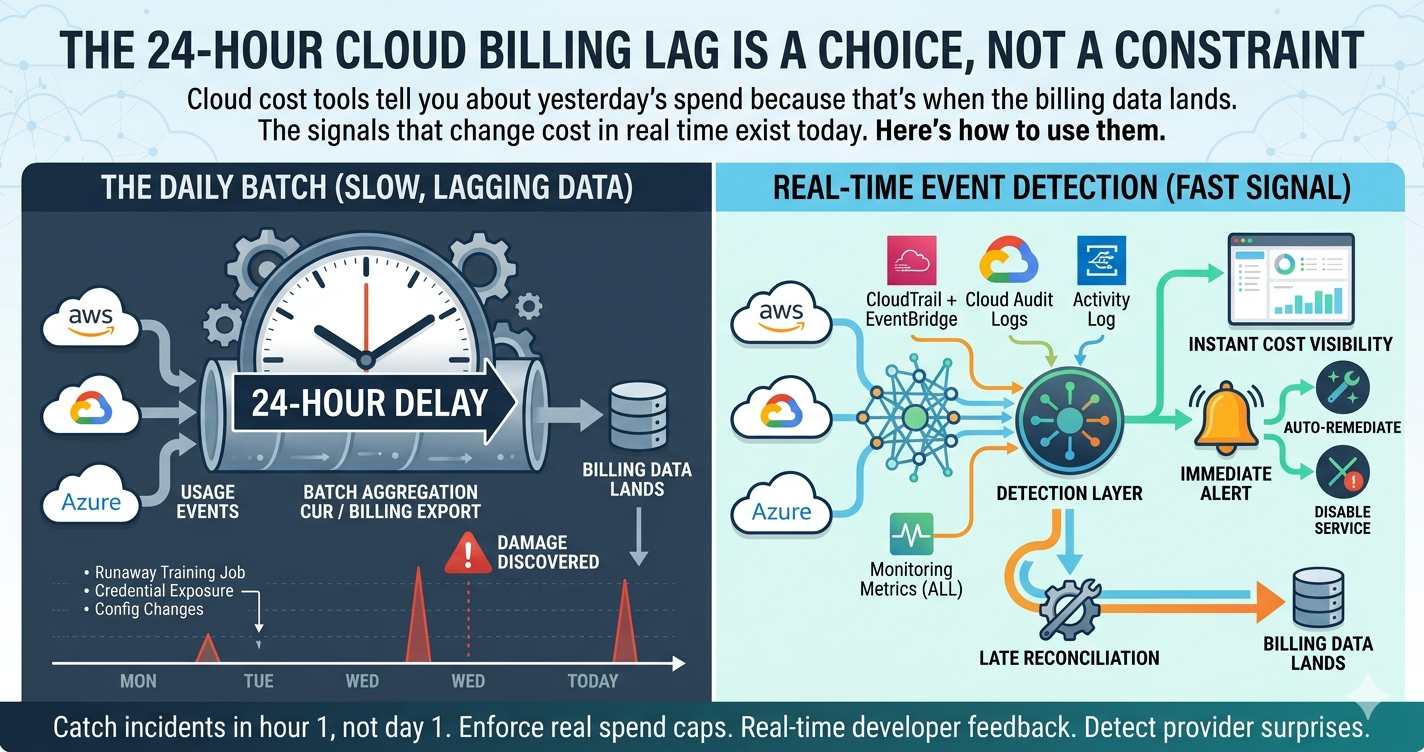
Every major cloud provider publishes billing data once a day. Every major cost management tool inherits that 24-hour lag because they read from the same source. By the time a runaway training job, a leaked API key, or a misconfigured agent shows up in your dashboard, the damage is already 18 to 30 hours old.
The lag is real but it is a choice, not a physical constraint. AWS, GCP, and Azure all expose real-time signals (CloudTrail events, Cloud Audit Logs, Activity Log, anomaly APIs) that update within minutes of the cost-changing action. This article covers why the 24-hour lag exists, what real-time signals each cloud actually provides, and the architecture pattern for combining real-time event detection with late reconciliation against billing data.
The end result: you find out about a cost spike in 5 minutes instead of 18 hours.
Why the 24-Hour Lag Exists (And Why Most Tools Inherit It)
The 24-hour delay in cloud billing data is a downstream consequence of how cloud providers aggregate usage. A virtual machine running for 60 seconds generates one usage record per metering dimension (compute time, memory time, disk time, network bytes). Multiply that by millions of customers and billions of resources and the volume becomes enormous.
Providers solve the volume problem by batching. Usage records aggregate into hourly or daily summaries before they appear in billing exports. AWS Cost and Usage Reports update at most once a day. GCP billing exports to BigQuery refresh several times per day but are not committed to historical state until the daily close. Azure Cost Management exports follow the same daily-batch pattern.
Most cost tools were designed when this lag was the only data available. They built their entire architecture around the daily refresh: pull the export, transform it, write it to a warehouse, query it, render the dashboard. Speed of insight is bounded by speed of the underlying batch.
The lag is fine for monthly accounting and quarterly forecasting. It is not fine for incident response, anomaly detection, or any signal that you actually want to act on the same day. Three categories of cost incidents play out faster than the billing data:
- Runaway training jobs: A misconfigured hyperparameter sweep or an exploding agent loop can spend $10,000 in 3 hours. The CUR will show it tomorrow.
- Credential exposure: A leaked API key being abused for inference (see our Firebase Gemini exploit article) racks up four-figure bills before the daily export lands.
- Configuration changes that flip pricing: Switching a SageMaker endpoint to a larger instance, enabling a paid Bedrock model, turning on a Generative Language API can change cost rates immediately. The spend rate change is invisible until the next billing close.
What Real-Time Signals Each Cloud Actually Provides
Every cloud provider exposes events that fire within minutes of the cost-changing action. The challenge is that these events are scattered across multiple services and were not designed for cost monitoring specifically. They were designed for security audit, operational alerting, and platform telemetry. Repurposing them for cost detection is straightforward but requires deliberate engineering.
AWS
| Signal | Latency | What It Tells You |
|---|---|---|
| CloudTrail Management Events | 15 minutes | Resource creation, modification, deletion (RunInstances, CreateBucket, ModifyDBInstance, etc.) |
| CloudTrail Data Events | 15 minutes | Object-level S3 access, Lambda invocations, DynamoDB queries (charge multiplier signal) |
| EventBridge | seconds | Service events (instance state changes, scaling group activity, billing alarm state) |
| CloudWatch Metrics | 1-5 minutes | Resource utilization, request rates, custom metrics |
| AWS Cost Anomaly Detection | hours | ML-based anomaly alerts on spend patterns (faster than CUR but not real-time) |
| AWS Health API | seconds | Service issues, scheduled changes affecting your account |
GCP
| Signal | Latency | What It Tells You |
|---|---|---|
| Cloud Audit Logs (Admin Activity) | seconds | Resource creation, modification, deletion |
| Cloud Audit Logs (Data Access) | seconds | API call volume on services like BigQuery, Cloud Storage |
| Cloud Logging Metrics | 1-2 minutes | Custom log-based metrics aggregated in real time |
| Cloud Monitoring Metrics | 1-3 minutes | Resource utilization, request counts |
| Pub/Sub for Audit Logs | seconds | Stream audit events to a topic for downstream processing |
| Recommender API | hours | Cost optimization recommendations from Active Assist |
| Budget Alerts | minutes (when triggered) | Per-budget threshold notifications via Pub/Sub |
Azure
| Signal | Latency | What It Tells You |
|---|---|---|
| Activity Log | seconds | Subscription-level operational events |
| Resource Logs (Diagnostic Settings) | seconds | Per-resource events when streamed to Event Hubs or Log Analytics |
| Azure Monitor Metrics | 1-3 minutes | Standard resource metrics |
| Cost Management Anomaly Detection | hours | ML-based spend anomaly detection |
| Azure Service Health | seconds | Service issues, scheduled maintenance |
| Event Grid | seconds | System events, custom events from resource changes |
The Architecture Pattern: Real-Time Detection, Late Reconciliation
The architecture that combines real-time signals with eventual billing accuracy looks like this:
REAL-TIME PATH (minutes)
Event Sources           Event Stream            Detection Layer        Actions
  ─────────────           ─────────────           ───────────────        ───────
  CloudTrail (AWS)    →                       →   Anomaly rules      →   Slack
  Audit Logs (GCP)    →   Pub/Sub / Kafka     →   Threshold alerts   →   PagerDuty
  Activity Log (Azure)→        SQS            →   Pattern matching   →   Auto-remediation
                                                          ↑
                                                          │
                                                  Calibrated rates
                                                          │
BILLING PATH (T+24h)                                      │
                                                          │
  Billing Data            Reconciliation                  │
  ─────────────           ──────────────                  │
  CUR (AWS)           →                                   │
  BigQuery export(GCP)→   Estimates vs Actuals    ────────┘
  Cost exports (Azure)→
The detection layer fires on real-time signals and emits provisional cost-impact estimates within minutes of the event. The reconciliation layer compares those estimates against the actual billing data when it lands the next day, calibrating future estimates against ground truth.
This is the same pattern used by financial systems for decades: real-time positions from order events, end-of-day reconciliation against settled trades. The accuracy is in the reconciliation. The speed is in the event stream. You do not have to choose.
A concrete example of how this plays out for inference cost:
- Event: A new Vertex AI endpoint is created (Cloud Audit Log, latency seconds).
- Estimate: The detection layer looks up the machine type, applies the per-hour rate from the Pricing API, and projects $X per day if the endpoint stays up.
- Alert: If $X exceeds a project-level threshold (configured per environment), notify the owner within 5 minutes.
- Reconcile: When the daily billing export lands, compare the actual cost for that endpoint against the estimate. Adjust the rate model if drift exceeds a tolerance.
What This Lets You Do That Billing Data Cannot
Real-time event detection unlocks four use cases that pure billing-data analysis cannot serve:
1. Catch incidents in the first hour, not the first day. A leaked API key being abused, a misconfigured training job, a forgotten endpoint left running over a long weekend. All of these accumulate cost faster than the billing data accumulates evidence. Real-time detection compresses the time to discovery from days to minutes.
2. Enforce spend caps that actually stop spend. Most "spend caps" in cloud cost tools are alerts, not enforcement. By the time the alert fires, the spend has already happened. Event-driven detection plus an automated remediation path (disable a service, terminate an instance, rotate a key) gives you actual enforcement, not after-the-fact notification. For the GCP-specific gap on hard spend caps and the Cloud Function disable-billing pattern, see our GCP Idle Resources Guide.
3. Provide live cost feedback to engineering during deployment. A pull request that adds a new resource can be evaluated against the pricing model before it merges. This is where shift-left FinOps actually delivers, when developers see the projected cost change before the deploy lands rather than three weeks later in a chargeback report.
4. Detect provider-side surprises. When a cloud provider silently changes the scope of a permission (see our Firebase Gemini key article) or adjusts pricing on an existing service, the only way to catch it before the daily close is to be watching the rate of activity per service in real time.
The FinOps Foundation Position on Data Freshness
The FinOps Foundation's KPI library identifies "data freshness" as one of the dimensions that distinguishes mature FinOps practices from beginner ones. Three sub-metrics matter:
- Detection latency: Time from cost-changing event to first alert. Mature: minutes. Common: 24 to 48 hours.
- Allocation latency: Time from cost-changing event to attributable cost in the dashboard. Mature: hours. Common: days.
- Reconciliation latency: Time from cost-changing event to verified actual cost. Same as billing data refresh, typically 24 hours.
For the broader context on how FinOps KPIs map to actual practice, the FinOps Foundation framework is the canonical reference. Our FOCUS guide covers how to standardize the underlying billing data once it does land.
Where to Start If You Are Behind
If your current cost monitoring is purely billing-data-driven, the first step is the smallest one: enable streaming for the audit logs you already have, route them to a queue, and start collecting events without trying to act on them yet. Three weeks of event data will give you the baseline rate of activity per service, which is what you need to set sensible thresholds.
After the baseline, the work is incremental. Pick one service that has caused you a cost incident in the past and build the detection rule for it first. SageMaker endpoints, Vertex AI endpoints, and forgotten EC2 GPU instances are common starting points. Run the detection in monitor-only mode for a week to validate it does not generate false positives, then enable alerting.
The full architecture (event stream, estimation layer, reconciliation, automation) is a multi-month build for a dedicated team. The first useful detection rule is a one-week project. Start with the smallest one.
The reconciliation layer, accurate cost attribution from billing data, is what makes event detection actionable at scale. Without it, you know something happened but not what it actually cost or which team owns it. Event detection without reconciliation produces alerts. Event detection with reconciliation produces accountable, allocated cost.
Related Resources
- Tracking AI and ML Costs Across Clouds for the AI-specific real-time cost detection patterns
- AI Agents for Cloud Costs for the broader case for continuous, agent-driven cost monitoring
- What Is FOCUS? for billing data normalization once it does land
- Multi-Cloud Cost Management Guide for the foundation under cross-cloud FinOps practice
Want the billing-data intelligence layer that makes real-time detection actionable? Brain Agents AI is built on FOCUS-normalized billing data across AWS, GCP, and Azure, with anomaly detection, cost attribution, trend analysis, and savings recommendations delivered by four AI agents. Real-time event detection is on the roadmap; today, we make sure that when your billing data does land, you have already understood it, attributed it, and recommended what to do about it.